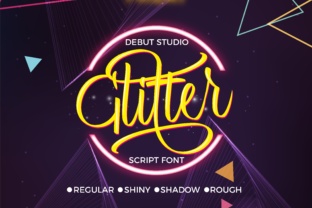
Glitter Script: A Modern Typeface for Digital Brands
I was staring at a hero section for a new boutique coaching website, and something felt off. The layout was clean, the photography was warm and inviting, but the headline lacked soul. It was too rigid. I needed a typeface that could bridge the gap between professional authority and approachable warmth. That is when I pulled Glitter Script into the design file. As soon as I swapped out the standard sans serif header, the entire mood of the page shifted. It wasn’t just about aesthetics; it was about creating an immediate emotional connection with the visitor.
For web designers and UI creators, finding the right script font is often a balancing act. You want ornamental charm, but you cannot sacrifice readability. Glitter Script, part of the Script Amp collection, manages this balance surprisingly well. It is inspired by natural handwriting, capturing the fluidity and imperfections of human touch while maintaining the precision required for digital screens. In this article, I want to walk through how I integrated this font into a real-world project, discussing its visual characteristics, pairing strategies, and practical considerations for responsive web design.
Visual Personality and Digital Appeal
The first thing you notice about Glitter Script is its ornamental beauty. It does not try to be minimalist or ultra-modern in the sterile sense. Instead, it leans into a decorative style that feels curated and intentional. The strokes vary in thickness, mimicking the pressure of a pen on paper, which adds a layer of depth to flat digital interfaces. This makes it an excellent choice for brands that want to convey creativity, elegance, or a personal touch.
In my recent project, I used it for the main value proposition in the hero banner. Because it is a display font, it commands attention without shouting. It sits comfortably in the "premium" category of typography. When you are building a brand identity for a high-end service or a creative portfolio, you need a typeface that signals quality. Glitter Script does this by feeling bespoke. It avoids the generic look of system fonts, giving the website a custom-designed feel even if you are working with a limited budget.
Strategic Placement in Web Layouts
One of the most common mistakes I see designers make with script fonts is overusing them. Glitter Script is powerful, but it is not a workhorse for body copy. Its strength lies in short, impactful phrases. During the design process, I restricted its use to three key areas: the main hero headline, section dividers, and pull quotes within the content.
For the hero section, I kept the text concise. Long sentences in a handwritten font can become difficult to scan, especially on mobile devices. By limiting Glitter Script to three or four words, I ensured that the message was absorbed instantly. For section headings, I used it to break up the visual rhythm of the page. It acts as a visual breath, guiding the user’s eye down the page and signaling a transition to new content. This helps with visual hierarchy, making the long-form content feel less intimidating and more digestible.
I also experimented with using it for call-to-action buttons, but I approached this with caution. While it looks beautiful, legibility is paramount for conversion elements. I found that it worked best for secondary buttons or decorative labels rather than the primary "Buy Now" or "Sign Up" actions. For those critical interactions, I stuck to a clean sans serif to ensure clarity and ease of tapping on touchscreens.
Readability and Responsive Considerations
Testing Glitter Script across different viewports was a crucial step. On a large desktop monitor, the ornamental details shine. The ligatures and swashes add a layer of sophistication that enhances the brand experience. However, on smaller mobile screens, these same details can sometimes clutter the visual space if the font size is too small.
To maintain readability on mobile, I increased the line height and ensured there was ample padding around the text. I also avoided placing Glitter Script over busy image backgrounds. High-contrast backgrounds, such as solid colors or softly blurred images, worked best. If you must place it over a photo, using a subtle drop shadow or a semi-transparent overlay can help separate the text from the background noise. This ensures that the font remains legible without losing its artistic flair.
Another consideration is loading performance. As a web designer, I always check the file formats and weights included in the font package. Glitter Script is optimized for web use, but like any premium font, it should be loaded efficiently. Using WOFF2 formats and setting proper font-display properties ensures that the text appears quickly, preventing layout shifts that can frustrate users and hurt SEO metrics.
Font Pairing for Balanced Design
A script font never stands alone effectively. It needs a partner to ground it. For this project, I paired Glitter Script with a neutral, geometric sans serif font for the body copy. This contrast is essential. The simplicity of the sans serif allows the script to be the star without competing for attention. If you pair two decorative fonts, the design becomes chaotic and hard to read.
I also considered a serif font for a more editorial look. While this can work for blog headers or magazine-style layouts, I found that the sans serif pairing felt more modern and aligned with the clean UI trends currently dominating web design. The key is to ensure that the x-height and weight of the body font complement the script. If the body text is too thin, it might disappear next to the bold strokes of Glitter Script. If it is too heavy, it can overwhelm the delicate nature of the script.
Licensing and Professional Implementation
Before finalizing any design asset, checking the licensing terms is non-negotiable. Glitter Script comes with commercial licensing options, which is vital for client projects, online stores, and SaaS products. Ensure that the license covers webfont usage, as some packages only include desktop files. Using the correct files for web embedding ensures that your typography renders consistently across browsers and devices.
Additionally, check for multilingual support if your target audience is global. While many script fonts are limited to basic Latin characters, verifying glyph coverage prevents issues with special characters or accented letters in international markets. This attention to detail reflects professionalism and ensures a seamless user experience for all visitors.
In conclusion, Glitter Script is more than just a decorative element. It is a strategic tool for enhancing brand personality and user engagement. When used with intention—respecting readability, pairing it wisely, and optimizing for performance—it elevates a standard web layout into a memorable digital experience. Whether you are designing a course sales page, a portfolio homepage, or a boutique e-commerce site, this typeface offers the ornamental charm needed to stand out in a crowded digital landscape.