Falcon Script Font for Modern Web Design
As digital creators, we often find ourselves balancing the need for structural clarity with the desire for emotional resonance in our layouts. Typography is the primary vehicle for this balance. While grid systems and whitespace define the skeleton of a website, the typeface defines its soul. This is where Falcon Script enters the conversation. As an informal iteration of the classic Kestrel Script by Alan Meeks, this typeface offers a distinct personality that bridges the gap between traditional calligraphy and contemporary digital aesthetics. For web designers, UI specialists, and brand strategists, understanding how to deploy a script font like Falcon Script can significantly elevate the perceived value of a digital product.
Understanding the Visual Personality of Falcon Script
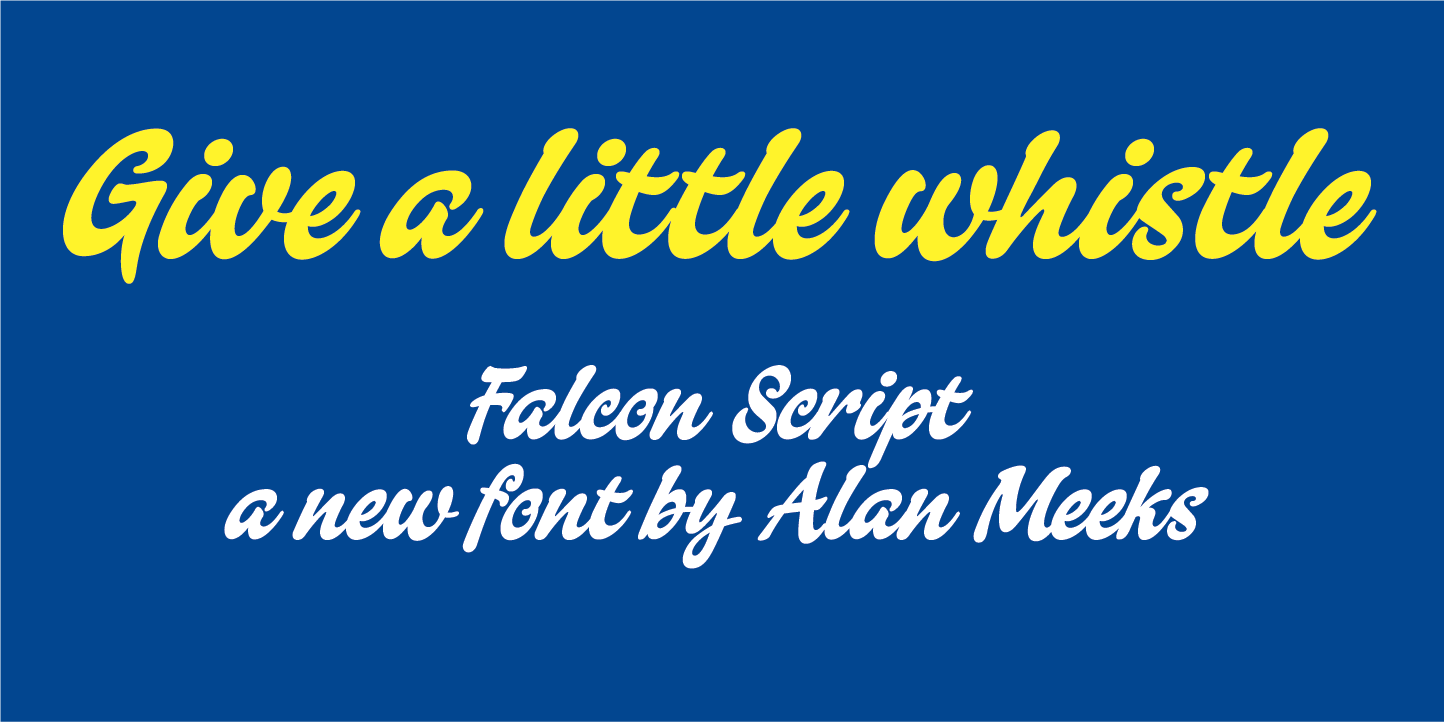
Falcon Script belongs to the Script Amp category of fonts, which suggests a lively, connected, and humanistic quality. Unlike rigid geometric sans serifs that dominate much of modern interface design, Falcon Script introduces organic movement. Its informal nature means it avoids the stiff formality of traditional copperplate styles, opting instead for a relaxed, approachable rhythm. This makes it particularly effective for brands that want to appear accessible yet polished.
The visual characteristics of Falcon Script include varied stroke weights and natural ligatures that mimic the flow of handwriting. In a digital context, these features serve a specific purpose: they break the monotony of screen-based reading. When used correctly, the font acts as a visual anchor, drawing the eye to key messages without overwhelming the user. It is not merely a decorative element; it is a tool for establishing tone. Whether you are designing a landing page for a creative agency or a product page for a boutique online store, the choice of a handwritten font signals authenticity and attention to detail.
Strategic Placement in Digital Layouts
The effectiveness of any display font relies heavily on context. Falcon Script is not designed for body copy. Attempting to use it for long paragraphs would compromise readability and frustrate users. Instead, its strength lies in short, impactful bursts of text. Here is how you can integrate it into various web components:
- Hero Sections: Use Falcon Script for the main headline or a sub-headline in your hero section. Pairing it with a bold, clean sans serif font creates a strong visual hierarchy. The script draws attention, while the sans serif ensures the core message is instantly understood.
- Call-to-Action Areas: A short phrase above a button, such as "Join the Community" or "Start Your Journey," can be rendered in Falcon Script to add a personal touch. This subtle cue can increase engagement by making the interaction feel less transactional and more relational.
- Testimonials and Quotes: Script fonts excel at highlighting social proof. Placing a customer quote in Falcon Script differentiates it from the surrounding editorial content, giving it the weight of a personal endorsement.
- Logo Design and Branding: For startups and solo entrepreneurs, Falcon Script can serve as the foundation for a logo mark. Its unique letterforms provide a memorable identity that stands out in crowded marketplaces.
Enhancing Readability and User Experience
Readability in web design is not just about legibility; it is about scanning behavior. Users do not read every word on a page; they scan for cues. Falcon Script supports this behavior by acting as a signpost. However, mobile responsiveness poses a challenge for script fonts. On smaller screens, intricate loops and tails can become illegible if the font size is too small.
To maintain clarity on mobile devices, ensure that Falcon Script is used at a sufficiently large point size. Avoid placing it over busy image backgrounds where contrast might be lost. If you must overlay text on an image, use a solid color block or a gradient overlay to ensure the white or dark strokes of the font remain distinct. Additionally, check the line height. Script fonts often require more vertical breathing room than standard typefaces to prevent ascenders and descenders from colliding with adjacent lines.
Mastering Font Pairing for Brand Identity
A standalone font rarely builds a complete brand identity. The power of Falcon Script is unlocked through strategic pairing. Since it is a decorative, high-personality typeface, it demands a neutral partner. The most reliable approach is to pair it with a modern sans serif font. This combination leverages the warmth of the script and the reliability of the sans serif.
For a more editorial or luxury feel, consider pairing Falcon Script with a refined serif font. This works exceptionally well for fashion blogs, artisanal online stores, or coaching websites where trust and elegance are paramount. The contrast between the flowing script and the structured serif creates a sophisticated tension that guides the user’s eye through the content. Avoid pairing it with another script or a highly decorative display font, as this creates visual noise and dilutes the brand message.
Technical Considerations for Web Implementation
Before integrating Falcon Script into your project, verify the technical specifications. Ensure that the font package includes webfont formats such as WOFF and WOFF2, which are optimized for fast loading times across browsers. Slow-loading fonts can negatively impact Core Web Vitals, affecting both user experience and SEO rankings.
Check for multilingual support if your target audience is global. Not all script fonts include extended character sets for accented characters or non-Latin scripts. Additionally, look for alternate glyphs. Many premium fonts offer stylistic alternates for certain letters, allowing you to customize the flow and avoid repetitive patterns in longer headings. This level of customization is crucial for creating a unique visual identity that does not look like a default template.
Licensing and Commercial Use
Finally, always respect intellectual property. Falcon Script is a commercial font, and its usage rights must be clearly understood. If you are using it for a client project, a SaaS platform, or an online store, ensure you have the appropriate desktop and web licenses. Using a font without proper licensing can lead to legal complications and damage professional credibility. Invest in the correct license to support the designer, Alan Meeks, and to ensure your digital assets are compliant and secure.
Incorporating Falcon Script into your design toolkit offers a way to inject humanity into digital spaces. It transforms static layouts into engaging experiences, guiding users with warmth and style. By respecting its limitations and leveraging its strengths, you can create web experiences that are not only functional but also emotionally resonant.